How to Cancel the Gym Group Membership Online (Easy Methods)
Canceling your Gym Group membership is simple but timing matters. Submit your cancellation at least 5 working days before your next billing date and make sure you use the right method depending on how you pay.
The key thing to know is that cancellation takes effect at the end of your current billing cycle, not immediately.
Your gym access continues until that date, and your direct debit stops on your next billing date. Miss the 5-day window, and you’ll be charged the full monthly fee.
- 5 working days notice required before your billing date to avoid an extra charge
- Direct debit payments must be canceled via Live Chat, you can’t do it online
- Cancellation is effective at the end of your billing cycle, not immediately after you request it
Canceling Direct Debit Payments
If you pay by direct debit or recurring card, you cannot cancel through the Member’s Area or app. You must contact Live Chat support.
This isn’t a workaround; it’s the only way to cancel these payment types due to payment processing security requirements.
✦ Open the Gym Group app
✦ Navigate to Help
✦ Then select Live Chat, or visit thegymgroup.com and click Support
✦ Live Chat will open
✦ Have your membership number ready. Tell support you want to cancel, and they’ll process it within 2 hours during business hours.
✦ If Live Chat is slow, email [email protected] instead.
Email responses typically take 1-2 working days. Always request a cancellation reference number and save the confirmation email as proof.
When Your Direct Debit Stops
If your billing date is June 30th and you cancel on June 3rd, you’ll keep gym access until June 30th, and your direct debit stops that same day.
➤ If you’re charged in error after missing the deadline, contact support within 7 days for a refund. Refunds typically process within 7 working days.
Canceling Via App or Member’s Area
This option is only available if you don’t pay by direct debit or recurring card.
- On the App first tap the menu icon
- Go to My Account
- Then My Membership
- Select your active membership.
- Look for the Cancel or Manage button and follow the steps.
- On the Website, log in
- Click your profile icon in the top right
- Go to My Membership
- Select the active membership you want to cancel.
The cancellation form will show your billing date and remind you of the 5 working days’ notice requirement. Once confirmed you will get an on-screen confirmation and a cancellation email within 2 hours. Save that email.
If you don’t see a Cancel button your payment method requires Live Chat support instead.
The 5 Working Days Notice Rule
You must submit your cancellation at least 5 working days before your next billing date. Working days are Monday to Friday only. Weekends and bank holidays don’t count.
If you cancel too late you will be charged the full monthly fee on your billing date.
Example: If your billing date is June 30th you need to cancel by June 23rd. Canceling on June 24th or later means you get charged.
If you miss the deadline and get charged, contact support right away. Refunds usually process within 7 working days.
Cancellation by Membership Type
The cancellation process is the same for Monthly, GymFlex, and Saver memberships. The 5 working days’ notice rule and billing cycle rules apply equally to all three.
The main difference is price, Saver memberships are typically 30-40% cheaper than Monthly plans but have limited peak-hour access.
If you have multiple memberships (like a personal plan plus a family plan), you can cancel just one while keeping the others active. Confirm which membership you’re canceling to avoid mistakes.
Downgrading Instead of Canceling
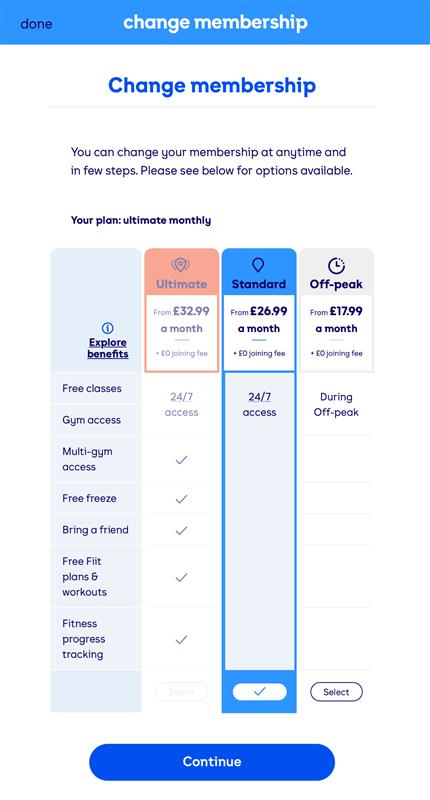
Before you cancel, consider downgrading to a cheaper plan. If cost is your main concern, switching from Monthly to Saver membership keeps you active without the cancellation hassle or reactivation process later.
To downgrade follow the steps:
➤ Log into the Member’s Area My Membership → Change Plan → select Saver → confirm.
Downgrading takes effect on your next billing cycle with no double charge.
After Cancellation
You’ll retain gym access until the end of your current billing cycle. If you cancel mid-June with a June 30th billing date, your access ends June 30th.
Pre-booked classes are forfeited from the cancellation date onward, you cannot attend classes after canceling, even if you booked them earlier.
Account credits and unused session packages are not refunded upon cancellation. They’re forfeited. If you have significant credits, contact support before canceling to confirm the policy or explore alternatives.
Your cancellation reference number will arrive via email. Save it. Your gym card or fob will stop working at the end of your billing cycle, you don’t need to return it unless support instructs you to.
Reactivating Your Membership
You can rejoin The Gym Group anytime after canceling. There’s no waiting period or penalty. Log into your old account using the same email and password, or create a new account if you prefer a fresh start.
Membership pricing may have changed since you canceled, so check current rates before reactivating. Reactivation takes 24 hours to process; you’ll have gym access the next day. Your old membership history is preserved if you use the same account.
14-Day Cooling-Off Period
New members who cancel within 14 days of joining are subject to proportionate usage charges if they’ve used the gym. You’re not entitled to a full refund, you’re charged based on how many days you actually used the facility.
If you cancel within 14 days without using the gym, you’re entitled to a full refund. This cooling-off period applies only to new members.
Existing members who cancel have no special cooling-off rights.
Frequently Asked Questions
Does The Gym Group Charge a Leaving Fee?
No. But if you miss the 5 working days notice deadline you will be charged your regular monthly fee for the next billing cycle. Contact support within 7 days if you think you were charged by mistake.
Can I Pause My Membership Instead?
Yes. You can freeze your membership for 1 to 3 months through the Member’s Area. Go to My Membership, select Pause/Freeze, choose your duration, and confirm. Good option if you are traveling or injured.
Will I Get a Refund If I Cancel Mid-Month?
No pro-rata refunds. If you cancel before the deadline you won’t be charged for the next month. New members within 14 days who haven’t used the gym get a full refund.
Why Can’t I Cancel Online?
If you pay by direct debit or recurring card, online cancellation is not available. You need to use Live Chat to cancel. Other payment types can cancel through the app or Member’s Area.