How to Cancel Nuffield Health Membership Step-by-Step
Canceling a Nuffield Health membership requires a written request sent directly to your home gym.
Most members run into trouble because they don’t understand the commitment period rules or keep getting charged after canceling.
Cancel Nuffield Health in 3 Steps
Step 1
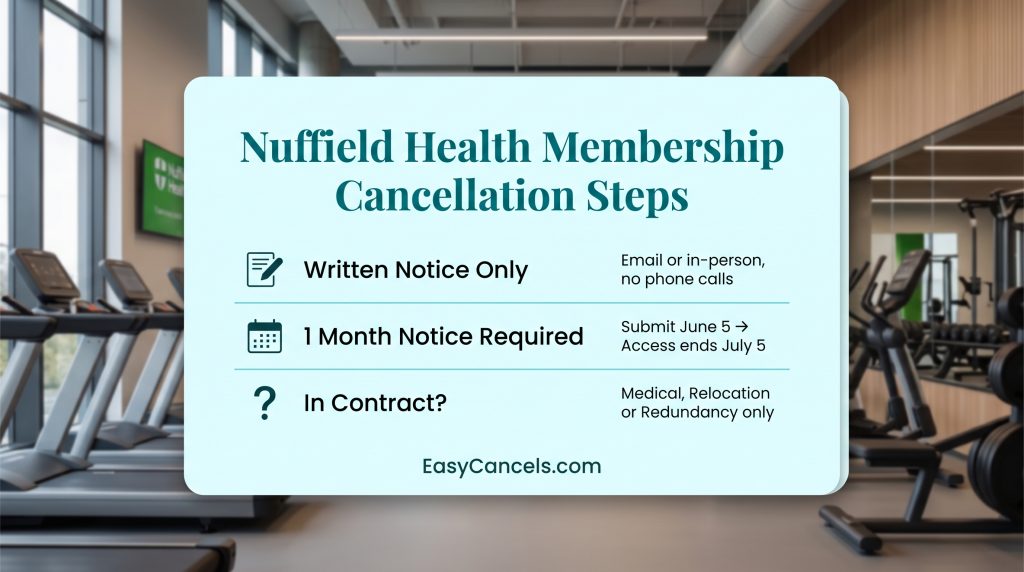
Submit a written cancellation request. Email your home gym or fill out an in-person cancellation form at the gym reception. Phone calls, online chat, or app submissions do not count as valid cancellation notices.
Step 2
Give one calendar month’s notice. From the date you submit your cancellation request, you must wait a full calendar month. If you cancel on June 5, 2026, your access ends July 5, 2026. You’ll be charged through the end date; partial month refunds are not issued.
Step 3
Request written confirmation. Within 5 business days, ask your home gym to send you a written cancellation confirmation email. Save this email, it’s your proof if billing continues after cancellation. Without this confirmation, disputing continued charges becomes much harder.
➤ If you’re within a commitment period (typically 12 months), you cannot cancel unless you meet a specific exemption. Attempting to cancel without an exemption means you’ll pay through the entire notice period with no early exit.
Commitment Period and Cancellation Exemptions
Most Nuffield Health memberships lock you in for 12 months. Check your contract or membership details in the app to find your exact commitment end date.
Outside your commitment period, you can cancel anytime with standard one month notice. During your commitment period, you can only cancel if you meet one of the three exemptions and you will need the required documents.
What Proof Documents Are Accepted
| Exemption Type | Accepted Documents | Format Requirements |
|---|---|---|
| Medical | GP letter | Official letterhead, dated within 30 days, stating “member is medically unfit for exercise” or similar language |
| Relocation | Utility bill or employment contract | Utility bill (gas/electric/water) dated within 3 months showing new address, OR employment contract showing new job location 50+ miles away |
| Redundancy | Redundancy letter from employer | Company letterhead, dated within 60 days, stating involuntary termination |
Cancellation rejections happen when documents are incomplete, missing letterhead, or dated too far in the past.
How to Submit Your Cancellation Request
Nuffield Health does not have one central cancellation email. You need to contact your specific home gym.
Go to the Nuffield Health website, click Locations, and search for your gym by postcode or city to find the contact details.
Once you have the email address, send your cancellation request in writing. You can also fill out a cancellation form at reception in person. Both count as valid notice.
After submitting, follow up after 5 business days and ask for a written confirmation email. Save that email as proof in case you keep getting charged.
Cancellation Letter Template and Required Fields
You can use this template to ensure your cancellation request includes all required information.
Dear [Gym Manager Name or “Manager”],
I hereby request to cancel my Nuffield Health membership effective [CANCELLATION DATE, minimum 1 calendar month from today].
Member Name: [Your Full Name]
Membership ID: [Found on billing statement or in app]
Home Gym Location: [Your gym name and city]
Current Email: [Your email address]
Phone: [Your phone number]I understand my membership will remain active for one calendar month from this request, with final access on [DATE] and final billing on [DATE]. Please send written cancellation confirmation to the email address above within 5 business days.
If cancelling due to exemption, add below:
I am cancelling due to [MEDICAL / RELOCATION / REDUNDANCY]. Proof of [exemption type] is attached.Yours sincerely,
[Your Signature or Typed Name]
Fill in all bracketed fields with your specific details. This language mirrors Nuffield Health’s contractual requirements, which significantly reduces rejection risk. Send this via email to your home gym’s cancellation email address.
Freeze or Cancel
Freezing pauses your membership for 3 to 12 months while keeping your contract active. Canceling permanently ends your membership and you cannot get the same tier back.
| Situation | Best Option |
|---|---|
| Temporary injury | Freeze |
| Switching gyms temporarily | Freeze |
| Moving abroad | Cancel |
| Temporary financial hardship | Freeze |
| Permanent lifestyle change | Cancel |
Note that freezing may still charge a small monthly hold fee of around £5 to £10. Check with your home gym before deciding.
Canceling the App vs. Gym Membership
Nuffield Health has two separate billing systems. Canceling one does not cancel the other. This is the main reason members keep getting charged after they think they are done.
- Nuffield Health 24/7 App: Cancel through your device’s app store settings
- Physical Gym Membership: Cancel via written notice to your home gym
Cancel the 24/7 App
- iOS: Settings → Your Name → Subscriptions → Nuffield Health 24/7 → Cancel
- Android: Play Store → Profile → Payments and Subscriptions → Nuffield Health 24/7 → Cancel
- Roku or Amazon Fire TV: Go to Subscriptions in app settings and cancel from there
If you canceled the app but are still being charged your gym membership is still active. Send a separate written cancellation to your home gym.