How to Cancel Your Calm App Subscription (All Platforms)
Canceling your Calm app subscription takes under two minutes once you know where to go. The problem is most people try to cancel in the wrong place, and Calm’s in-app cancel button doesn’t help.
I will cover every platform in this guide. iPhone, Android, Samsung Health, Huawei, direct Calm.com accounts, Family Plans, and employer benefits. Find your platform and follow the steps directly.
- Cancel where you subscribed, not inside the Calm app itself.
- Your Premium access continues until the current billing period ends, even after cancellation is confirmed.
- Cancel at least 24 hours before your trial ends or you’ll be charged for the next full billing cycle.
After Cancelling the subscription
Canceling Calm Premium does not delete your account. Your login, meditation streaks, and saved content stay intact.
Once your billing period ends your account drops to the free tier and Premium content becomes unavailable until you resubscribe.
Your Premium access continues until the end of your paid period so canceling today does not cut off access tonight.
➤ The 24-hour rule matters most if you are on a free trial. On a 7 day trial Day 6 is your last safe day to cancel. Missing the window by even a few minutes triggers a charge for the full billing period.
Check your trial end date in your subscription settings right after signing up and set a phone reminder for Day 5 or 6.
In-App Cancel Button Does Not Work
The “Cancel Subscription” button inside the Calm app is grayed out or does nothing for most users. This is not a bug.
Calm processes billing through Apple, Google Play, Samsung Health, and Huawei. Calm’s own servers cannot cancel subscriptions started through those platforms.
Contacting Calm support will not work if you subscribed through Apple or Google Play. Calm support can only cancel direct Calm.com purchases.
Cancel Calm by Platform
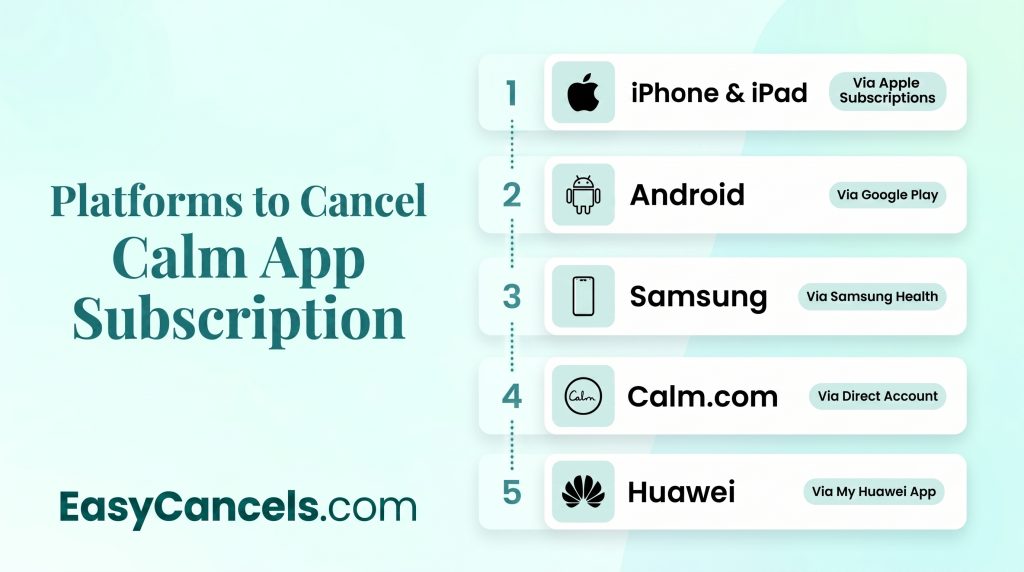
Check your original signup email first to find out which platform billed you then go to the right section below.
Canceling on iPhone or iPad
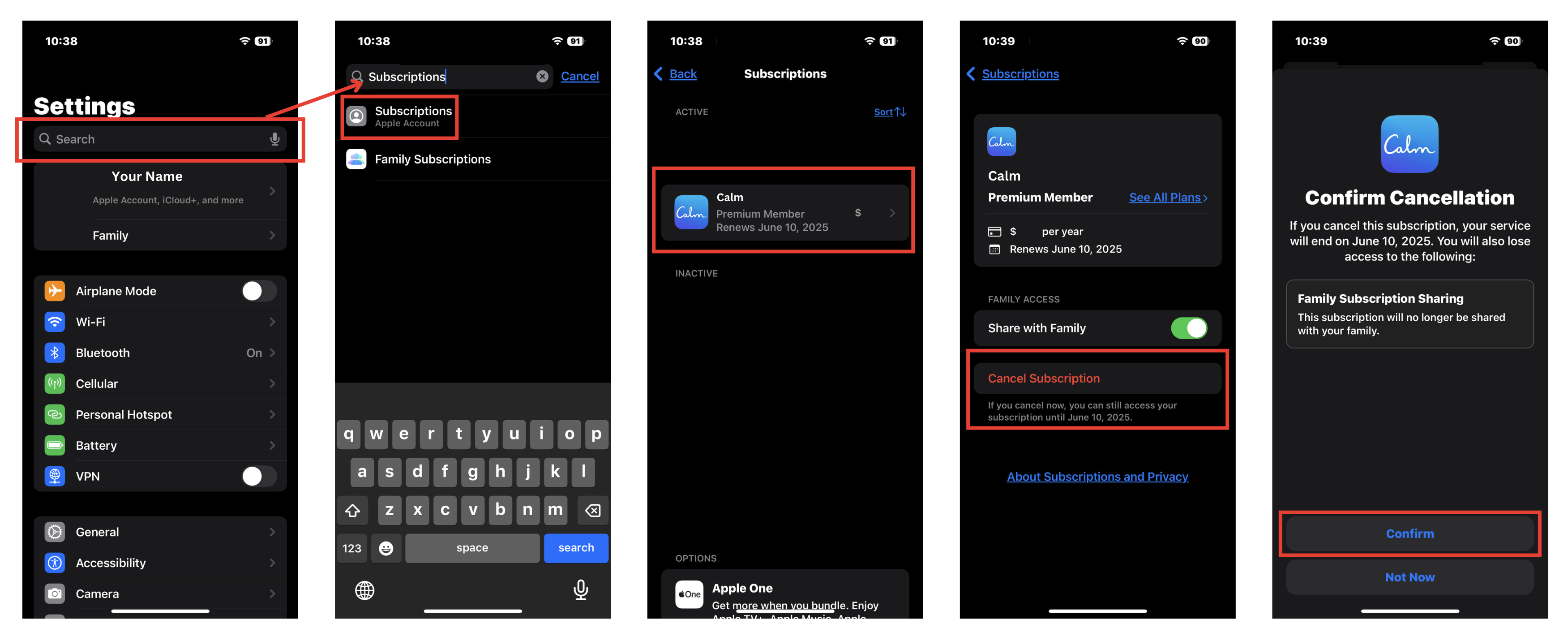
- Open Settings and tap your name at the top
- Tap Subscriptions and find Calm in the list
- Tap Cancel Subscription
You can also go to appleid.apple.com, sign in, open Subscriptions, and cancel from there. After canceling screenshot the “Expires on date” screen as proof.
If Calm does not appear you likely signed up under a different Apple ID. Check every Apple ID you have ever used at appleid.apple.com.
Canceling on Android via Google Play
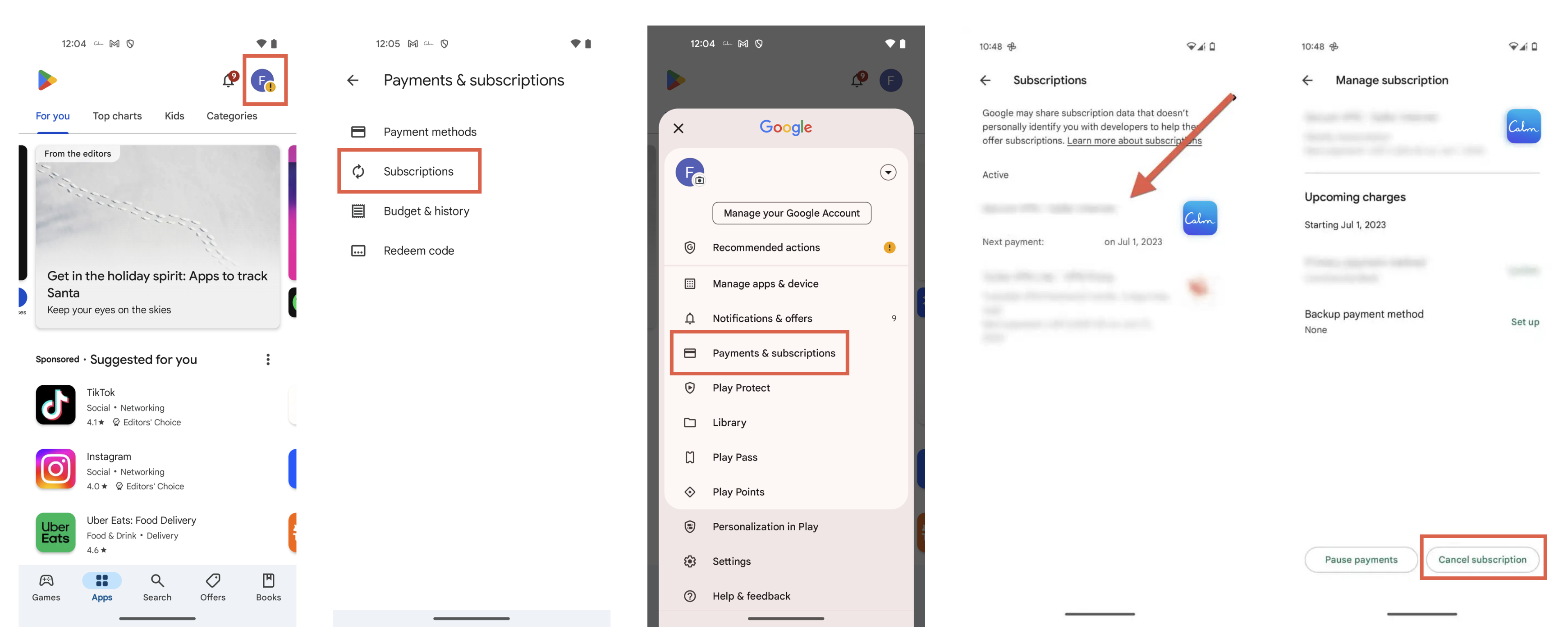
- Open Google Play and tap your profile icon in the top right
- Go to Payments and Subscriptions then Subscriptions
- Find Calm and tap Cancel Subscription
You can also do this at play.google.com. After canceling note the “Expiring on date” shown on screen. Samsung Health subscribers cannot use this path.
Canceling Through Samsung Health
- Open the Samsung Health app and tap Profile in the bottom right
- Tap your active subscription and select Calm
- Tap Cancel Subscription
Confirm cancellation by checking that Calm no longer shows as Active in Samsung Health subscriptions.
Canceling a Calm.com Direct Subscription
- Go to calm.com/profile and open Settings
- Click Manage Subscription then Cancel Subscription
- Follow the prompts until you see a confirmation message
Save the confirmation email as proof. If you want a refund contact Calm support at calm.com/help right away as you have a 30 day refund window.
Canceling on Huawei Devices
- Open the My Huawei app and tap Me
- Go to Subscriptions and find Calm
- Tap Cancel
You can also do this at consumer.huawei.com. This path is completely separate from Google Play and cannot be done through the Calm app.
Family Plans, Employer Benefits, Gift Cards
Canceling a Calm Premium Family Plan works differently.
➤ Only the Family Admin can cancel the plan, and it must be done via calm.com/profile, not through the app and not through Apple or Google. Individual family members can remove themselves from the plan, but they can’t cancel it entirely.
If you got Calm through an employer wellness benefit (through Aetna, Cigna, or a corporate portal), standard app store and Calm.com cancel flows won’t apply.
➤ Contact your HR or benefits administrator, or the specific wellness platform that granted access. Your original signup email will identify the source.
Access granted via a gift card or promo code typically expires automatically. No action is needed, but double-check the expiration date in your Calm account settings to be sure.

Refunds and Confirming It Worked
Canceling a subscription does not automatically trigger a refund on any platform. You must request a refund separately.
| Platform | Refund Window | Where to Request |
|---|---|---|
| Calm.com direct | 30 days | calm.com/help |
| Google Play | 30 days | Google Play support or “Report a Problem” |
| Apple / App Store | No guarantee | reportaproblem.apple.com (Apple decides) |
Calm cannot issue Apple refunds on your behalf. You submit the request directly to Apple and they decide case by case.
Confirm Cancellation Worked
- Apple: Settings shows “Expires on date” instead of a renewal date
- Google Play: Subscription status changes to “Expiring” with an end date
- Calm.com: Confirmation email arrives within minutes
Screenshot the confirmation screen on your platform and save it as proof.
If you still have Premium access after canceling that is normal. Access runs until the end of your billing period. Canceling stops the next charge, not your current access.
Frequently Asked Questions
Calm isn’t in my subscriptions list. Now what?
You probably signed up under a different account. For Apple check every Apple ID you have used at appleid.apple.com. For Google switch between all Google accounts in the Play app. Also check Samsung Health, Huawei AppGallery, and calm.com directly since none of those show up in Apple or Google lists.
Can I Switch from a Monthly to a Yearly Plan Before Canceling?
Yes you can upgrade to an annual plan at any time through your platform’s subscription settings. An annual plan costs less overall so if you are on the fence about canceling it might be worth switching first to save money before making a final decision.
Will I lose my data after canceling?
No. Your account, login credentials, and meditation history stay intact. After the billing period ends, you lose access to Premium-only content but keep everything on the free plan. If you resubscribe later, your full account history comes back.